Trim Router vs Compact Router: What Is the Difference? (November 2026)
A trim router and a compact router overlap in size, but a trim router usually means a fixed base tool for edge work, while a compact router is a broader small router category. In this trim router vs compact router guide, power source, base options and included bits matter more than the name on the box.
On this page (13 sections)
- The quick verdict on trim router vs compact router
- Trim router vs compact router side by side
- Why the names overlap so much
- Power and speed: what the numbers mean
- Size, weight and control in your hand
- Bases, guides and bits included
- Depth adjustment and accuracy
- Dust control and visibility
- Corded vs cordless: which should you buy?
- Which jobs suit a trim router vs a compact router?
- Who should buy which model?
- Care, setup and honest trade offs
- The verdict on trim router vs compact router
A trim router is usually a small fixed base router for edge work, and a compact router is the broader small router category that includes many trim style tools.
You should shop by power, base, speed and included parts, not by the label alone. A 1.25 HP compact router and a 1.5 HP trim router can both shape an edge, but they differ in weight, runtime and depth control.
We compared four models below. Our score weighs specs, features and buyer feedback against what you are shopping for in this trim router vs compact router comparison.

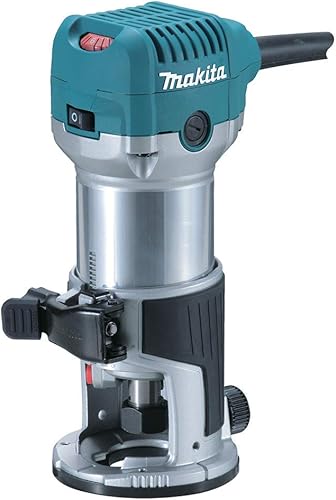
The quick verdict on trim router vs compact router
Pick a corded kit for value and a cordless trim router for freedom of movement.
The AVID POWER 6.5 Amp 1.25 HP Compact scores 9.7 because it brings bits and guides in one box. The Makita RT0701C 1-1/4 HP Compact Router scores 9.6 and suits buyers who want base flexibility.
The FLEX 24V Brushless Cordless 1.5 HP Trim also scores 9.6 and leads on cordless trim control. The Milwaukee Cordless Compact Router scores 9.5 and suits hard wood work on battery power.
All four use fixed bases. Start with power source and weight, then check collet size, speed range and whether bits and guides are included.
Trim router vs compact router side by side
The table shows the real differences: power source, speed, weight and included parts.
| Model | Power | Speed | Weight | Base | Key included or noted |
|---|---|---|---|---|---|
| AVID POWER 6.5 Amp 1.25 HP Compact | 1.25 HP corded | 10,000 to 32,000 RPM | 4.4 lb | Fixed | 5 bits, edge guide, roller guide, dust hood |
| Makita RT0701C 1-1/4 HP Compact Router | 1.25 HP corded | 10,000 to 30,000 RPM | 3.9 lb | Fixed | Removable base, accepts template guides |
| FLEX 24V Brushless Cordless 1.5 HP Trim | 1.5 HP cordless | 16,000 to 31,000 RPM | 6 lb | Fixed | Edge guide, battery not included |
| Milwaukee Cordless Compact Router | 1.25 HP cordless | 10,000 to 31,000 RPM | 4.8 lb | Fixed | Macro Adjust, 1.5 in range |
The AVID POWER kit is the most complete out of the box. The Makita is the lightest at 3.9 lb and the most open to other bases.
The FLEX is the most powerful on paper at 1.5 HP, but it is also the heaviest at 6 lb. The Milwaukee sits in the middle at 4.8 lb with fast depth adjustment.
Why the names overlap so much
Retailers use trim router and compact router for similar small tools, so the names overlap by design.
A trim router points to the job, which is edge trimming and shaping. A compact router points to the size, which is smaller and lighter than a full size router.
Many compact routers are sold as trim routers because their fixed base and small body suit edge work. Check the motor, base and collet instead of trusting the name, as our guide to wood routers for woodworking helps you sort tools by job.
Power and speed: what the numbers mean
Horsepower and RPM tell you how the tool handles hard wood, soft wood and different bits.
The FLEX lists 1.5 HP, while the other three list 1.25 HP. That gap matters most in hard oak and repeated passes, where a stronger motor holds speed better.
Speed ranges run from 10,000 RPM on the AVID POWER, Makita and Milwaukee to 16,000 RPM on the FLEX at the low end. High ends run from 30,000 to 32,000 RPM.
Lower speed helps reduce burning in hardwoods. Higher speed helps with clean finishes in softwoods and laminates, as AVID POWER notes for its 10,000 to 32,000 RPM range.
Speed settings by material
Use lower settings for larger bits and hardwoods. Use higher settings for small bits and softer stock, then watch the edge for heat.
Makita lists electronic speed control to maintain constant speed under load. That helps when a bit bites into dense wood and the motor would otherwise slow.
Corded power vs battery power
Corded models give steady power for long sessions at a bench. Cordless models give freedom for cabinets, doors and large panels.
FLEX notes an average runtime of 275 feet per charge with a 5.0Ah battery in its test on red oak with a 3/8 inch roundover bit.
Size, weight and control in your hand
Weight and body shape decide how long you can work with control.
The Makita weighs 3.9 lb, the AVID POWER weighs 4.4 lb and the Milwaukee weighs 4.8 lb. The FLEX weighs 6 lb, which can feel top heavy on long edge passes.
Makita describes a slim and ergonomically designed body for comfort and control. AVID POWER lists a rubber covered handle for a non slip grip during longer jobs.
Milwaukee lists a metal body and a compact 3.21 by 6.88 inch size. That small footprint helps in tight corners, but test grip with gloves if you use them.
Fixed base control
All four models here use fixed bases. That suits trim work because the base sits flat on the work and the motor locks at one depth.
A fixed base is less forgiving than a plunge base for deep cuts. It is better for edges, templates, grooves and detail work where you set depth once and guide the tool.
Bases, guides and bits included
Included parts can save more money than a small price gap at checkout.
The AVID POWER kit includes 5 router bits, an edge guide, a roller guide, a dust hood, 1/4 inch and 3/8 inch collets, spare carbon brushes and wrenches. That makes it ready for straight cuts, curves and basic shaping.
The FLEX includes a quick adjust edge guide, but battery and charger are not included. For table-mounted routing, compare router table fences.
The Makita fixed base accepts industry standard template guides and removes quickly for other bases.
The Milwaukee data lists the unit and instruction guide. Check the exact package before you order if you need bits or guides on day one.
Which kit fits your first jobs
Choose a bit kit if your first jobs are edge rounding, chamfers and hinge slots. Choose a guide first if you will cut straight grooves or follow templates.
Our best compact router kit roundup helps you compare kits by what is in the box. Look for collet sizes that match bits you already own.
Depth adjustment and accuracy
Depth control decides whether a groove or edge profile comes out clean or wavy.
AVID POWER lists a smooth rack and pinion system that locks tight during use. Makita lists a smooth rack and pinion fine depth adjustment system for more precise settings.
FLEX lists quick release collars with depth adjustment accurate to 1/64 inch. Milwaukee lists a Macro Adjust button with 1.5 inches of adjustable range for fast changes.
Set depth with the tool off and the bit clear of the work. For easier above-table adjustments, compare router tables with lift systems.
Make a shallow test cut in scrap, check the depth, then adjust before you cut the workpiece.
Locking and repeat cuts
A quick lock or cam lock helps when you repeat the same depth across a frame. Makita lists a quick release cam lock for depth adjustments and base removal.
AVID POWER lists a quick lock system for depth adjustments and base changes. Both help you return to the same setting without hunting for it.
Dust control and visibility
Dust control and light help you follow layout lines and keep edges clean.
AVID POWER includes a dust hood that hooks up to a standard shop vac. It also lists dual LED lights that shine on the cutting path for dim spaces.
That combo helps on under counter work and cabinet interiors. You can see the line, and the vac keeps dust from hiding the bit.
The other models here do not list a dust hood in the data above. If you work indoors or cut MDF, plan for dust collection and a respirator as your manual directs.
Safer setup habits
Wear eye and ear protection and keep your hands clear of the bit path. Use a sharp bit, secure the workpiece and let the motor reach speed before contact.
Our best small wood router guide covers small router picks for detail work. Pair any pick with dust control sized for your shop vac.
Corded vs cordless: which should you buy?
Choose corded for long bench sessions and cordless for work away from an outlet.
Corded AVID POWER and Makita models keep power steady for repeated passes. You trade freedom of movement for runtime and a direct power source.
Cordless FLEX and Milwaukee models free you from cords on doors, cabinets and large panels. You trade runtime limits for mobility and a lighter setup on site.
Our best cordless trim router guide helps cordless buyers compare runtime, batteries and weight. Check battery size before you assume a tool will finish a long job.
Total cost beyond the tool
Cordless tools may need batteries and chargers. FLEX lists battery and charger as not included, and Milwaukee lists the unit in the data here.
Corded kits may need bits, guides and template guides. The AVID POWER kit reduces that gap, while the Makita path may add bases and guides over time.
Which jobs suit a trim router vs a compact router?
Both suit edges and small cuts, but compact routers with removable bases suit more varied jobs.
Use a trim or compact router for edge rounding, chamfers, small grooves, hinge mortises and laminate trimming. Use it for template guided cuts when the base and guides support them.
Use a larger router for deep dados, wide panels and heavy stock removal. A small router can do light versions of those jobs, but it will need more passes and more care.
If you cut trim for a room, pair router work with a Best Miter Saw For Trim Work pick for clean crosscuts. Then finish the profile with a small router and a test cut in scrap.
Edge work sequence that works
Cut the stock to size first, then ease or shape the edge with the router. Sand with the grain after routing, since the bit leaves a different surface than a saw.
For a straight edge, use an edge guide or a straightedge clamp. For curves, use a roller guide or a template and move at a steady pace.
Who should buy which model?
Buy by job pattern: kit value, base flexibility, cordless freedom or hard wood power.
Choose the AVID POWER 6.5 Amp 1.25 HP Compact if you want a ready to use kit at a budget friendly tier. The 5 bits, edge guide, roller guide and dust hood help you start on shelves, table edges and hinge slots.
Choose the Makita RT0701C 1-1/4 HP Compact Router if you want the lightest tool and a path to other bases. Template guide support and a removable base help as your jobs grow.
Choose the FLEX 24V Brushless Cordless 1.5 HP Trim if you work on cabinetry and doors away from an outlet. Its 1.5 HP brushless motor and 1/64 inch depth accuracy suit precise trim work.
Choose the Milwaukee Cordless Compact Router if you cut hard woods on battery power. The brushless motor, 10,000 to 31,000 RPM range and Macro Adjust suit fast depth changes.
Our best compact router for woodworking roundup helps you compare more picks by use.
Trim work with a miter saw
Router work often follows saw work. Cut trim to length with a miter saw, then route the profile or ease the edge.
Our How To Use Miter Saw For Trim? guide helps you plan cuts before you rout. Fewer test pieces means less wasted trim.
Care, setup and honest trade offs
All four tools reward sharp bits, clean bases and steady passes.
Clean the base and collet area after each session and check the bit for pitch. Store bits so edges do not knock against each other in the case.
Check depth locks before each cut and secure the workpiece with clamps. A small router can climb on an edge if the work moves or the bit bites too deep.
The honest trade off is simple. Corded tools give runtime, cordless tools give freedom, kits give parts and bare tools give flexibility later.
A simple setup routine
Mount the bit fully, lock the motor, set depth on scrap and test the cut. Keep the base flat, move at a steady pace and take shallow passes in hard wood.
Let the motor reach full speed before contact and avoid forcing the tool. If the edge burns, check speed, bit sharpness and feed rate before you change tools.
Wear protection, keep the work area clear and unplug or remove the battery before bit changes. FLEX lists a Spindle Stop shaft lock to help prevent inadvertent startups during bit changes.
The verdict on trim router vs compact router
Choose the name last and the features first: power source, weight, base options and included parts decide the winner.
For most new buyers, the AVID POWER kit is the easiest start. Pick the Makita if you want the lightest corded tool and a base system that can grow.
Pick the FLEX if cordless trim work is your main job and you already use 24V batteries. Pick the Milwaukee if you want cordless hard wood cutting with fast Macro Adjust depth changes.
Skip any model if its collet size does not match your bits. Start with one solid tool, sharp bits and a test piece, and your edges will improve fast.
Frequently asked questions
What is the difference between a trim router and a compact router?
A trim router usually describes a small fixed base router used for edges, while a compact router is a wider size category that can include trim style and slightly larger fixed base tools. In practice, compare horsepower, base type, collet size, speed range and what is in the box.
The name alone does not tell you what jobs the tool will handle.
Can a compact router do trim work?
Yes, most compact routers in this guide can do trim work because they have fixed bases, variable speed and small bodies for one handed control. Lower speeds help in hardwoods and higher speeds help with clean finishes in softer woods and laminates.
Check the collet size and bit list before you buy so your existing bits fit.
Is a cordless trim router strong enough?
Cordless models here list 1.25 to 1.5 HP and speeds up to 31,000 RPM, which covers shaping edges, trimming and light grooves. Runtime depends on the battery and the material, so plan for spare batteries on long jobs.
Corded models remove runtime limits but tie you to an outlet.
Which is better for a beginner?
A beginner often does best with a kit that includes bits and guides, plus variable speed for learning material differences. The AVID POWER kit includes 5 bits, an edge guide and a roller guide, which helps you start without extra purchases.
Add dust control and eye and ear protection from the start.
Do I need a trim router or a full size router?
Choose a trim or compact router for edges, small grooves, templates and detail work where control matters more than maximum power. Choose a full size router for large table work, deep cuts and heavy stock removal.
Our wood routers for woodworking guide helps you place each size in a shop plan.


