Why Wait for a Miter Saw Blade to Stop?
Wait for the miter saw blade to stop completely before lifting the head or reaching for an offcut. This prevents contact with a coasting blade and gives dust time to clear.
On this page (7 sections)
Wait for a miter saw blade to stop completely before lifting the head, moving the workpiece, or retrieving an offcut. Releasing the trigger stops the motor, but the blade may continue rotating briefly.
That brief coast is the risky gap between a finished cut and a finished task. The saw sounds quieter and the cut looks complete, yet the teeth are still moving through the space where your hand would naturally go next.
Keep the saw head down while the blade coasts. Hold the handle steady and let the saw return to stop on its own, rather than trying to wave it down or lift early to save a few seconds.
When the blade is motionless, lift the head by its handle only. Move your hand clear of the cutting area before you reach for anything else on the table.
Collect the offcut from a safe position, away from the blade path. Check that the guard has covered the blade before you shift the workpiece or clear scraps around the cut line.
Why wait for a miter saw blade to stop?
Waiting prevents contact with a rotating blade after the cut is complete. It also reduces the chance that a loose offcut shifts while the blade is still moving through or near the work area.
A miter saw cut has several separate moments: the blade enters the material, the cut finishes, the trigger is released, and the blade slows down. The work isn't finished until the blade stops and the head can rise under control.
Don't reach behind the blade to grab a short piece. Keep both hands away from the blade path, and support the workpiece on the correct side of the cut.
For round stock, follow how to secure it on a miter saw.
For a broader routine, follow How To Use A Miter Saw Safely?. That guide covers safe positioning, workpiece support, and basic operating habits.
What should you do immediately after the cut?
Release the trigger while keeping the saw head down. Maintain control of the handle and let the blade coast to a complete stop before lifting anything.
Don't raise the head to speed up the blade's stop. Don't brush away sawdust, move the board, or pull the offcut while the blade is still rotating.
Once the blade stops, lift the head smoothly. Check that the guard has returned to its normal position, then remove the offcut from the side of the saw rather than reaching across the blade.
If you are new to this tool, read Is a Miter Saw Safe for Beginners? before making repeated cuts. A slower rhythm gives you time to confirm the blade is clear and the material is stable.
What if the offcut is trapped?
Leave a trapped offcut alone until the blade stops. If the piece is pinched, wait for the saw to stop, switch off power as directed by the manual, and resolve the obstruction without placing your fingers near the blade.
Never use your hand to pull a small piece away while the blade is moving. A short offcut can shift suddenly as the cut closes or the blade clears the material.
Does reverse cutting change the waiting rule?
No. You still wait for the blade to stop before lifting the head or touching the workpiece.
The cutting direction does not make a moving blade safe to approach.
A reversed or unusual cutting action can change how the material reacts. Keep the workpiece firmly supported and avoid any setup that causes the blade to climb, pull, or push the material in an unexpected direction.
See What Is Reverse Cutting on a Miter Saw? for the term and the risks it raises. If a cut feels unstable, stop and reset the work rather than trying to finish quickly.
Should the blade guard stay in place?
Yes, keep the guard fitted and working as designed. The guard helps cover the blade when the head is raised, but it doesn't make it safe to reach toward a blade that is still rotating.
Do not hold, tie, or remove the guard to make a cut easier. Check that it moves freely and returns over the blade after the cut.
Read Is It Safe to Use a Miter Saw without a Guard? if your guard is damaged, sticks, or has been removed. Stop using the saw until the guard issue is resolved according to the manual.
How does dust control fit into the stop routine?
Dust control should continue briefly after the saw stops, but it does not change the blade-stop rule. A vacuum can clear airborne debris while you keep the head down and wait.
A connected dust switch can delay vacuum shutoff after the tool stops. That delay is useful for clearing remaining dust, but the saw still needs to be motionless before you lift the head or reach for an offcut.
Which Ortis switch suits adjustable delay needs?
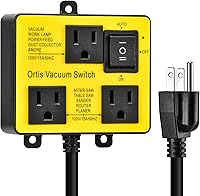
The Ortis Automatic Vacuum Switch with a configurable threshold and delay suits a workshop that wants more control over vacuum timing. It offers 30W or 60W actuation thresholds, 3-second, 7-second, or 10-second shutoff delays, and a 1-second turn-on delay.
It has two tool outlets and three vacuum modes: Auto, Off, and On. It supports tools such as miter saws, table saws, power sanders, routers, joiners, and planers up to 120V/15A, 50/60Hz, and 1875W.
Choose this option when the vacuum timing needs to match different tools or cleanup habits. Confirm that the connected motor stays within the stated 120V/15A and 1875W limits.
Which Ortis switch suits a simple automatic setup?
The second Ortis Automatic Vacuum Switch suits readers who want automatic vacuum switching with a fixed 7-second shutoff delay. In Auto mode, the vacuum starts after a 1-second delay and continues for 7 seconds after the tool stops.
It has two tool outlets, Auto, Off, and On modes, and mounting options using screws or traceless wall-mounting adhesive. It supports miter saws, table saws, power sanders, routers, joiners, and planers up to 120V/15A, 50/60Hz, and 1875W.
Choose it when a fixed delay fits your normal cutting routine. The delay helps manage airborne dust, but you still need to keep the saw head down until the blade has stopped.
When is the KTNNKG remote switch useful?
The KTNNKG 120V Remote Outlet Automatic Vacuum Switch suits a setup where you want both tool-activated vacuum control and remote operation. Its VAC outlet starts after the TOOL outlet reaches 30W, with a 1-second start delay and a 7-second shutoff delay.
It includes 2 remotes with batteries and has a stated working distance of 328 ft, or 100 meters. The unit supports vacuum cleaners, track saws, miter saws, table saws, power sanders, routers, and planers up to 120V/15A and 1800W.
Choose it when the vacuum is away from your cutting position or remote control would simplify operation. The remote can control the vacuum outlet, but it does not replace the saw's trigger, guard, or blade-stop procedure.
How can you make waiting easier during repeated cuts?
Build the blade-stop wait into every cut cycle. Cut, release the trigger, keep the head down, watch for complete stoppage, lift the head, and then move the offcut.
Support long stock so it doesn't twist or drop when the cut finishes. Keep the cut line clear of clamps, hands, and loose scraps before starting the saw.
Use the correct blade for the material and cut. Our guides to Best Miter Saw Blade and Which Miter Saw Blade To Use? can help you compare blade choices before changing one.
Don't rely on a quiet vacuum or a stopped motor sound as proof that the blade has stopped. Look at the blade and wait until its rotation ends.
What is the safe decision rule?
For miter saw wait for blade stop safety, keep the head down after releasing the trigger and wait for visible stillness before lifting or retrieving anything. Trust what you can see on the blade, not the sound of the motor or the sound of a vacuum winding down.
The guard, workpiece support, and dust switch all help, but none removes the need to wait. Each one solves a different part of the routine, and none can make a rotating blade safe to approach.
Pick the B096VP13FP Ortis switch if you want adjustable actuation and shutoff timing. That choice suits a workshop where different tools and cleanup habits call for different delays.
Pick the B0CBJ6QHKT Ortis switch for a simpler fixed-delay setup. It suits a steady routine where one timing setting fits most cuts.
Choose the KTNNKG switch if remote vacuum control matters. That suits a larger shop where the vacuum sits away from the cutting position.
A dust switch can keep cleanup moving after the cut, but the blade-stop rule stays the same: release, hold, wait, then lift.
Frequently asked questions
Why should you wait for a miter saw blade to stop?
Wait for the miter saw blade to stop completely before lifting the head or reaching near the cut. A blade can keep rotating after you release the trigger, so moving too soon puts your hand near a moving cutting edge and can disturb the workpiece or offcut.
Can you lift a miter saw head while the blade is spinning?
No. Keep the head down and the trigger released until the blade has stopped.
Once the blade is motionless, lift the head by its handle, keep your hands away from the blade path, and remove the offcut only when it is no longer held against a moving blade.
How long should you wait for a miter saw blade to stop?
Wait until the blade is visibly motionless, rather than counting a fixed number of seconds. The stopping time can vary with the saw, blade, and condition of the equipment, so the safe rule is to keep the head down until all rotation ends.
Does a dust switch make miter saw use safer?
A dust switch can help manage debris by starting a connected vacuum after the tool reaches its threshold and delaying shutoff after the tool stops. It does not replace waiting for the blade to stop, keeping the guard in place, or following the saw manual.